
Right then, Michael.
We’re diving into one of photography’s most over-dramatic myths — the kind that gets shouted across forums like it’s gospel at Download.
“YOU MUST PRINT AT 300 DPI OR IT’LL LOOK AWFUL.”
Calm down, mun. 🧃
Let’s talk real-world results — gig poster sized, wall-mounted, festival-field proof reality.
📸 First Things First – What Even Is PPI?
PPI = Pixels Per Inch.
It’s basically how tightly your image pixels are packed when printed.
More PPI = more detail
Less PPI = less detail
BUT — and this is where it gets spicy — viewing distance changes everything.
The bigger the print, the further back people stand.
Your eyeballs are clever little anti-aliasing machines. 🧠👀
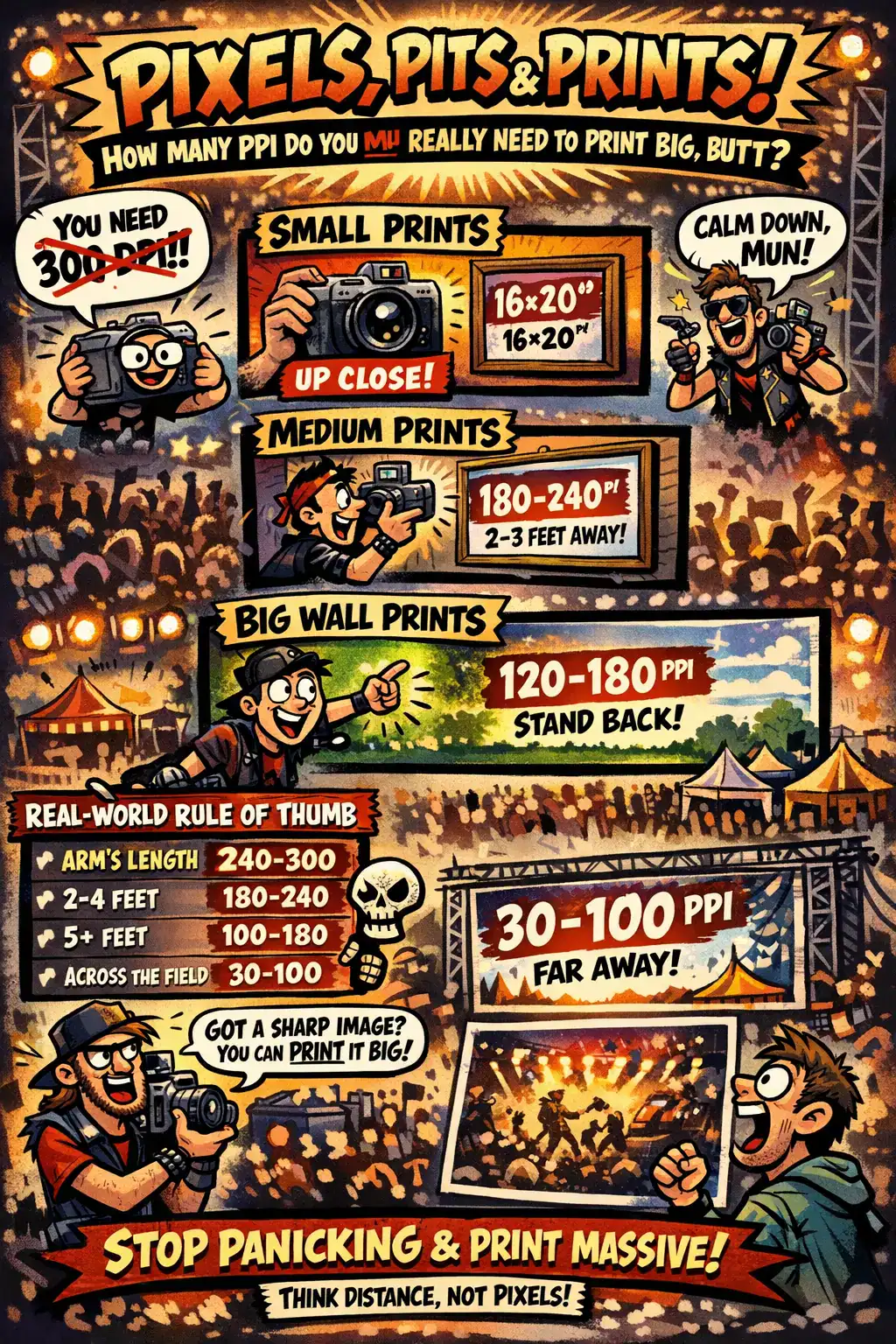
🤏 Small Prints (Up to A4 / 8×10”)
If someone can hold it like a photo book or inspect it like they’re judging your pit photography skills:
👉 240–300 PPI
That’s your crisp, magazine-quality zone.
Perfect for:
- Zines
- Photo books
- Press kits
- Close-up art prints
This is where detail sings louder than a Les Paul through a Marshall stack. 🔥
🖼 Medium Prints (A3 / A2 / 16×20”)
Now we’re into “hung on the wall above the record shelf” territory.
Viewing distance = about 2–3 feet.
👉 180–240 PPI
Still lush. Still sharp.
Most pro labs are absolutely fine with this.
Truth bomb? Most humans cannot tell the difference between 240 and 300 unless they’re nose-to-paper after three pints of Doom Bar. 🍺
🏟 Big Boy Wall Prints (A1 / A0 / 24×36” Posters)
Think gig photography framed in the hallway.
Think Steelhouse sunset shot dominating the lounge.
Viewing distance increases.
👉 120–180 PPI
Totally normal.
Totally professional.
Totally fine.
You do NOT need 300 PPI for a massive pit shot unless your mates plan to inspect it with a microscope and a judging clipboard.
🎪 Festival Banners & Billboards
Now we’re in “seen from across the car park” mode.
👉 30–100 PPI
Yes. Really.
Billboards are designed for distance.
Your eyes blend everything together like a human Lightroom preset.
Up close? Slightly soft.
From 20 metres away? Chef’s kiss. 👌
🎯 Real-World Rule of Thumb
Here’s your Riff Report cheat sheet:
| Viewing Distance | Sweet Spot PPI |
|---|---|
| Arm’s length | 240–300 |
| 2–4 feet | 180–240 |
| 5+ feet | 100–180 |
| Across a field | 30–100 |
Print size isn’t a law handed down by the Pixel Council of 1998.
It’s about distance and perception.
📷 Practical Example – 24MP Gig Shot
Let’s say you’re rocking a 6000 x 4000 pixel image (standard 24MP camera).
You can print:
- At 300 PPI → 20 x 13 inches
- At 180 PPI → 33 x 22 inches
- At 120 PPI → 50 x 33 inches
Same file.
Different assumptions.
Same riff energy. 🤘
🔥 What Actually Matters More Than PPI
Here’s the bit no one shouts about loudly enough:
- Sharp original image (focus + shutter speed > pixel obsession)
- Good upscaling software (modern AI scaling is borderline witchcraft)
- Good lighting in the shot (sorry, smoke machine victims)
If your source image is sharp, you can print surprisingly big without drama.
🎸 Final Thought from the Pit
Stop panicking about 300 PPI like it’s sacred scripture.
Printing big is about confidence, distance, and knowing your audience.
No one stands six inches away from a 36” pit shot going, “hmmm yes I detect interpolation.”
They stand back and go:
“THAT’S MENTAL.” 🤘🔥
And that’s what matters.
Now go print that Steelhouse sunset, mun.
Make it massive. Make it loud.